
my three best iphone
automations right now
These are the tiny systems that make my phone work more like I do.
Oct. 3, 2026 | Make it Simpler | 8 Minute Read
I have a very scientific method for deciding what to automate: it's asking myself How many times am I going to do this before I get annoyed?
That's pretty much it.
I didn’t get into iPhone automations because I wanted to become a Shortcuts person. I got into them because I was emailing myself constantly. A thought about a client. A link. Something I wanted to remember. An idea for later. Email. Email. Email.
At some point, I looked at the thousands of messages in my inbox and thought, Andrea. We cannot continue living like this. And honestly, that’s how most of my automations start. Not: What cool thing can I make my phone do? More like: Why am I still doing this the hard way?
I started out looking for the best one-click automations for my iPhone. Turns out, the ones I use most range from one tap to no taps at all.
If I do something repeatedly, or I know it could be more efficient, I start poking around to see whether I can make it easier. Sometimes I can. Those are the automations I keep.
Automation No. 01
The one that finally stopped me from emailing myself
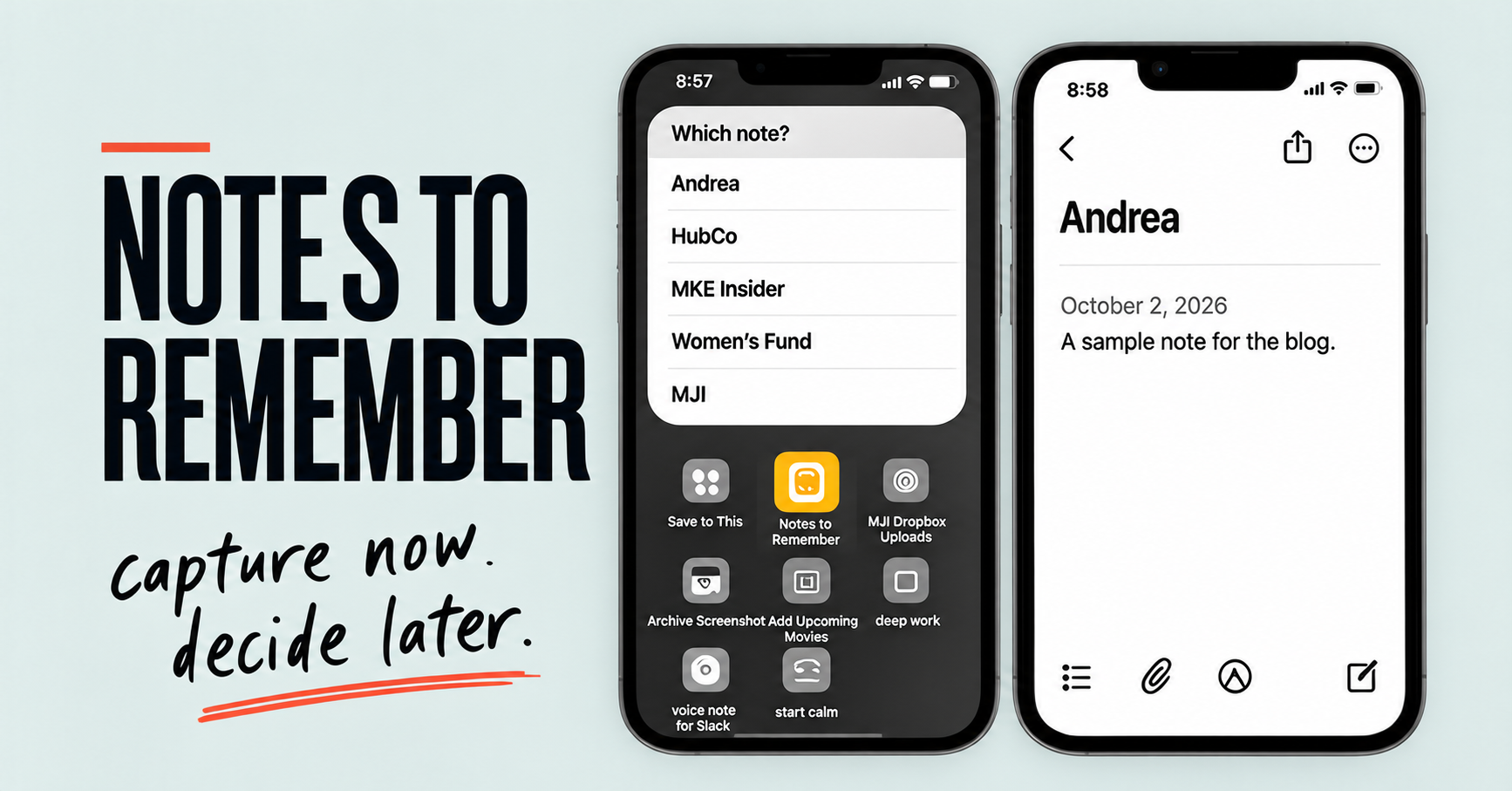
I built a Shortcut called Notes to Remember. I know. that's an extremely literal name. But, hey, we’re solving problems here not naming racehorses. When I tap it, a little box opens and asks me where the note belongs. Andrea. HubCo. MKE Insider. Women’s Fund. MJI.
I choose one, type whatever I need to capture, and the Shortcut sends it to the right page in Apple Notes with the date. Already better than my former system of “email Andrea and hope Future Andrea understands what Past Andrea meant.”
But then it grew with me. I can save links. If I’m using the Share Sheet, I can send photos or videos into it too. So now when I run across something I want to keep I don’t have to stop and figure out where it belongs. I just capture it. Once a week, I go through what landed there. Some things need action. Some turn into inspiration. Some move somewhere else. And some were apparently very important on Wednesday but by Friday I have absolutely no idea what the fuss was about. In those instances I simply delete the note all together.
That weekly review is probably why the system works for me. And here's something I've realized since building it: I could automate that part too. I don't want to. The Shortcut is very good at putting things where I can find them again. It is not in charge of deciding what deserves my attention. That's my job.
Capture now. Decide later. That turned out to be a much better system than emailing myself 3,000 times.
Automation No. 02
The button I sometimes hit twice
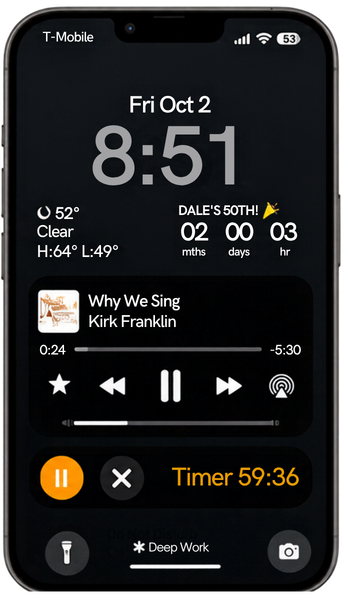
My Deep Work Shortcut may be the least exciting automation I have. It’s also one of the most useful. When I tap it a 60-minute timer starts... my deep-work playlist starts... and Do Not Disturb turns on. At the end of the hour Do Not Disturb turns off.
And that’s the whole production. No productivity dashboard. No elaborate pre-work ritual. No spending 25 minutes preparing to focus. The button is the transition. Okay. We’re doing this now. I could add more to it. I deliberately don't. Timer. Music. Do Not Disturb. Those are the three things I need to cross the line from I should concentrate to actually concentrating.
The part I didn’t expect? A lot of the time the hour ends and I hit the button again. Another hour.
That’s probably the best review I can give it. It makes the thing I wanted to do easy enough that I want to keep doing it. And that’s one reason I don’t judge an automation only by how much time it saves. Some of the best ones save decisions. Or remove that tiny bit of friction between I should do this and actually doing it. That counts too.
Automation No. 03
My phone changes before I remember to change it
This is probably my most favorite setup right now. And technically, this one isn't even one-click. It's no-click. My phone automatically shifts Focus Modes throughout the day. I didn’t realize how much I would love that until I had it.
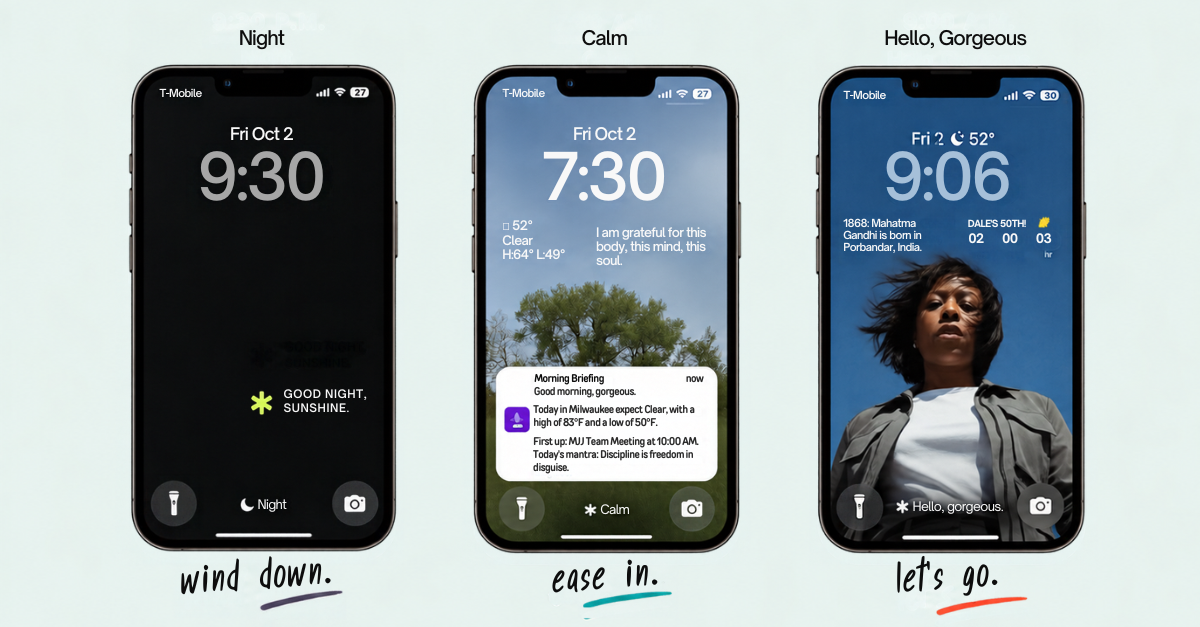
At 9:30 p.m., Night takes over. My lock screen changes. My Home Screen changes. And what I see there is very intentionally boring. Kindle. Podcasts. A few apps I might actually want at night. That's about it. No app notifications get through. No people notifications get through. Except one special person. Because nighttime Andrea does not need the entire internet, or the entire population, having access to her. She has proven this.
Then at 7:30 a.m., my phone moves into Calm. Different lock screen. Different Home Screen. Different apps. Same notification rule: nothing gets through except that one person.
Calm also gives me my morning briefing. The weather. The first thing on my calendar. And a daily mantra.
I set the automation up to change the mantras quarterly so they actually fit the season I’m in. Because I do not need January-new-year-new-you wisdom popping up in October. We’ve moved on.
Then at 9 a.m., my regular Focus kicks in. It’s called Hello, Gorgeous. Obviously. Again: its own lock screen. Its own Home Screen. The apps I actually need for that part of my day.
The whole thing just… happens. I don’t remember to switch anything. I don’t have to think, Oh, I should probably change Focus Modes. My phone changes before I think about changing it. That's what I love most.
I could have just scheduled Do Not Disturb at certain times and called it a day. But I didn't only want my phone to be quieter. I wanted it to be different. At night I need fewer options. In the morning I want to ease in. During the workday I want the things that help me do my work. Same phone. Different needs.
Apple lets a Focus use its own Lock Screen and Home Screen and control which people and apps can notify you; time-based automation can also run without you manually starting it. That's the technical stuff underneath what I'm doing here. But the reason I built it has almost nothing to do with the technical stuff. I built it around my energy. That's the part that matters to me.
This is usually where Shortcut advice loses me
Every so often I’ll see a Shortcut online and think: Oh, that could be useful. Then I open the instructions. Twenty-seven actions. Variables. Nested menus. Five apps. Some API key appears out of nowhere.
Sir. I was just trying to save a note.
I know some people genuinely enjoy building complicated Shortcuts. Godspeed. But I don’t think complicated should automatically mean better. Especially when you’re new to this.
The other thing that gets me is how often we're handed someone else’s finished automation without much help figuring out how to make it fit our own lives. So we copy it. Their apps. Their routine. Their categories. Their idea of what needs automating. Then we stop using it, which makes sense.
My setup works because it’s mine. Your version probably shouldn’t look exactly like it. That’s the point.
You don’t need Night > Calm > Hello, gorgeous. But you might read that and think: Wait. What would I want my phone to give me at different points in my day? Now we’re getting somewhere.
I’d rather start with the annoying thing
If you want to try this, I wouldn’t start by hunting for the most impressive Shortcut you can find. I'd pay attention to your own day. There's probably something you've already done three times today that irritated you just enough to notice.
Maybe you keep putting the same kind of information in the same place. Maybe you open the same apps every morning. Maybe it takes you ten minutes to settle into focused work. Maybe you’re forever changing the same phone settings. Maybe you keep thinking: There has to be an easier way to do this.
That’s where I’d start. And I’d make the first version almost boring.
Do one useful thing. Use it. See what happens. If you keep thinking, I wish it also did this, add that later. That’s how mine grew. I didn’t sit down one afternoon and build the master system for my phone. I just kept noticing little bits of friction. And fixing them. One at a time.
I think I have another automation rule now
I started with: There has to be an easier way to do this. But after building enough of these, I think I've added another one:
automate until the
friction is gone.
Then stop.
My Notes Shortcut captures things for me. I still decide what matters. Deep Work creates the conditions. I still have to do the work. My Focus Modes change the environment around me. They don't decide how I spend my day. That's about as much control as I want to hand over.
Make the repetitive part easier. Keep the part that needs your judgment. That's useful technology to me. And if it takes 47 steps to save me 12 seconds? I'm probably going to keep doing it manually, and I'm fine with that.
Want to poke around before you build anything?
Apple's Shortcuts guide is actually useful for seeing what's possible without starting with somebody else's 47-step masterpiece. The Focus guide shows what you can change by Focus, including people, apps, screens, schedules and filters. Apple Support
short notes. real context. no hype.
Reading the Room is where I make sense of what I’m testing, noticing, and questioning about AI, automation, better systems, and how we actually want to work. Twice a month, I’ll send the whole thought... not just the social media version. Pull up a chair.